Recently, a WordPress site hosted at OVH (a french web host) started showing several abnormal behaviors. The database was far above the allowed quota (five hundred megabytes on the “Perso” plan), and the site display sometimes triggered redirections to external online shops, a classic sign of compromise.
After the first SFTP access to the hosting server, it quickly became obvious that several elements were not normal.
Here are the main steps and actions taken to clean the infection and restore a healthy website.
Step one 🧭 Discovery of malicious files inside wp content
Inside the main WordPress directory were several files that never appear in a legitimate installation:
• mhkrrc dot php
• db config dot ini
• another random filename similar to mkhrcc dot php
None of these files belonged to WordPress, any plugin, or any theme.
Step two 🔐 Analysis of mkhrcc dot php, a complete backdoor
The file contained obfuscated PHP code using for example:
• POST variables named b, f, c
• dynamic reconstruction of file put contents and base sixty four decode
• an MD five hash check acting as a password
This backdoor allowed full remote access:
• remote file upload
• direct write access to the root
• reinfection through additional malware
• total server control through a simple POST request
Step three 🧪 Analysis of mhkrrc dot php, InjectBody module
Its content was a serialized configuration:
a:4:{s:7:"enabled";s:1:"1";s:7:"timeout";i:300;s:6:"filter";s:16:"_posts|_postmeta";s:8:"loadstat";s:125:"<!-- stats -->";}This structure is typical of malware families documented by Sucuri and Wordfence. It is used to:
• inject JavaScript or HTML into pages
• execute remote code
• inspect and modify posts and postmeta
• ensure persistence even after updates
Step four 🗄️ Analysis of db config dot ini, a malicious cache
Despite using an ini extension, it contained serialized PHP acting as an “internal memory”, used to automatically reload the payload whenever an infected file was deleted. This indicates an infection designed to survive classic cleanups.
Step five 🧷 Diagnostic summary
The site was affected by a complete infection chain involving:
• a backdoor uploader (full remote access)
• an InjectBody loader (dynamic code injection)
• a persistent configuration (automatic reinfection)
This pattern corresponds to attacks referenced by Sucuri, Wordfence and OWASP.
Step six ⚠️ Extended analysis: critical errors after restoring wp admin
Each attempt to replace the wp admin folder triggered a critical error.
The site was running WordPress five point eight point twelve while the hosting environment had been switched to PHP eight point three, which already caused incompatibilities. Malicious files spread across several areas explained the overall instability.
Step seven 🗺️ Mapping infected areas
Several directories, sometimes very old, contained executable PHP code.
The infection extended beyond the WordPress core.
One • Backdoors at the WordPress root
Files identified:
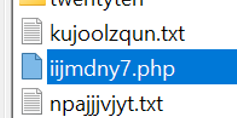
• wp blogs dot php
• iijmdny seven dot php
• other corrupted PHP files
Two • Fake plugin disguised as legitimate
Directory: wp content/plugins/HelloDollyV2 jwbq
Infected file: hello dolly v two dot php
It contained a class named UnsafeCrypto enabling remote command execution via AES two fifty six CTR encryption.

Three • Scripts inside unrelated directories
Directory: audio/ad
Sub folders: style, theme/upload/temp
Abnormal files:
• modified index dot php
• several txt files containing hidden PHP
Four • Backdoor inside the well known folder
A PHP file using base sixty four decode, md five, glob, capable of:
• sending files
• executing commands
• changing permissions
Summary of threats
File or folder | Malicious function | Main risk
Root backdoors | Remote access | Full control
Fake plugin HelloDolly v two | Encrypted command execution | Continuous reinjection
audio/ad | Persistence scripts | Automatic reinfection
well known | Hidden webshell | Unlimited upload
Step eight 🔍 Technical analysis of the infection
The malware provided:
• persistence through multiple anchor points
• remote execution through the encrypted fake plugin
• concealment inside directories unrelated to WordPress
This prevented any classic restoration and caused deleted files to reappear automatically.
Step nine 🛠️ Intervention and restoration
The intervention took place in three phases:
Complete removal
All identified PHP files outside the WordPress structure were deleted.
Clean reinstall of the WordPress core
The wp admin and wp includes folders were fully replaced with official versions matching WordPress five point eight point twelve.
Server checks
Disk space, previously saturated by malicious caches and useless files, was normalized.
The WordPress dashboard immediately became operational.
The database size went from more than five hundred megabytes to approximately four hundred megabytes, and finally stabilized around forty three megabytes.
Result 🎉 A clean and secure website ready for the future
After every backdoor was removed, the site regained:
- stable operation
- ability to update WordPress normally
- a database within OVH limits
- a secure environment free from injections or reinfections
This use case reflects a frequent situation: an outdated site, an abrupt PHP upgrade, and dormant leftover files from an old infection.
Recovery is not just a compatibility issue but a matter of detection, analysis, and methodical cleanup.
Time required for detection and cleanup ⏱️
One • Initial analysis and diagnostic: forty five minutes to one hour
• front and admin access tests
• inspection of symptoms (critical error, redirections, server overload)
• quick FTP scan and first abnormal file detection
• check of PHP and WordPress versions
Two • Full server exploration: forty five minutes to one hour
• audit of folders outside WordPress
• manual search for hidden PHP files
• comparison with a clean WordPress structure
• detection of scattered backdoors
Three • Cleanup and security: forty five minutes to one hour fifteen
- removal of all identified backdoors
- cleaning of parasite directories
- permission checks
- inspection of automatically recreated files
- review of well known, audio, root, plugins, uploads
Four • Clean reinstall of WordPress core: fifteen to thirty minutes
• replacement of wp admin
• replacement of wp includes
• verification of version and PHP compatibility
• admin load test
Five • Final control and server optimization: twenty to forty minutes
• front and admin browsing tests
• database cleaning
• log verification
• OVH disk check
• installation or activation of a security solution
FAQ ❓ WordPress infection and repair
Some malware families add several backdoors in various directories. Even if you delete one infected file, a loader can automatically recreate it. A complete cleanup requires checking the entire server, including folders outside WordPress.
Random names such as iijmdny seven dot php, mhkrrc dot php, or mkhrcc dot php are typical. Others hide inside fake plugins, audio folders, temp folders, or the well known folder. Any PHP file that is not native to WordPress must be examined.
A serious cleanup generally requires between two hours thirty and five hours depending on the severity. It includes analysis, backdoor removal, clean reinstall of WordPress, testing, and full server review.
Yes. At least wp admin and wp includes must be replaced with official versions. Core files must never be modified. Replacing them ensures the source code has not been altered.
Yes. If your site uses an old WordPress version or outdated plugins, switching abruptly to PHP eight point two or eight point three can cause fatal errors. PHP should be adjusted only after verifying compatibility.
Your WordPress site is hacked right now 🚨
If your site is showing a critical error, weird redirects or a blocked dashboard, the cause is often a hidden file, a conflict or an outdated component. I can assist quickly.
I intervene within twenty four hours to:
- analyse and clean infected files
- check and secure your server
- reinstall a clean and safe WordPress
- prevent any recurrence
Freelance WordPress webmaster for fifteen years
Vous souhaitez voir Yes We Blog en priorité dans vos résultats Google ?