

Google Business Profile is adding a useful new metric for businesses that regularly publish Google Posts: you can now see how many times each post has been viewed.
Until now, publishing updates, offers or events on a Business Profile could sometimes feel like working with very little feedback. You could use Posts to keep a profile active and provide useful information to potential customers, but measuring the actual visibility of individual publications was not particularly straightforward.
The new Google Posts reporting feature changes that by displaying view data directly within Google Business Profile.
For business owners, webmasters and local SEO professionals, this provides a simple new way to understand whether people are actually seeing the content published on a Business Profile.
What are Google Posts ?
Google Posts allow businesses to publish content directly through their Google Business Profile. Depending on the purpose of the publication, businesses can currently create Updates, Offers and Events. Posts can include elements such as text, images, videos and action buttons.
These publications can help potential customers discover current information about a business while browsing its presence on Google.
An e-commerce business might highlight a special offer, for example, while a restaurant could announce an event and a local service provider could publish an update about a new service.
Google notes that Posts more than six months old are normally archived unless a date range has been specified.
What is new with Google Posts reporting ?
The important change is that Business Profile managers can now access a view count for individual Google Posts.
Rather than simply publishing a Post and wondering whether anyone actually encountered it, businesses can begin comparing the visibility of their different publications.
The reporting covers Posts published during a rolling 18-month period.
Views are aggregated across the two main Google environments where customers can discover a Business Profile:
- Google Search
- Google Maps
The reporting applies to the different types of Posts, including regular updates, offers and events.
This is particularly interesting because Google Business Profile performance data already provides information about how customers discover and interact with a business on Search and Maps. Existing performance metrics include profile views and actions such as website clicks, calls and direction requests.
Post views add another level of information: the performance of the content you publish on the profile itself.
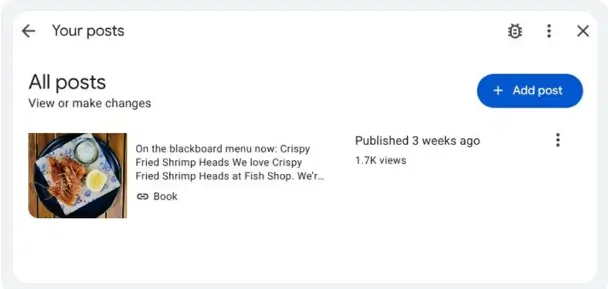
How to see the number of views on a Google Post
Access is straightforward.
Sign in to the Google account used to manage your Business Profile and open the relevant profile. Go to the Posts section, where your published content is displayed.
The number of views can then be found on the individual Post cards.
This means you do not need a third-party local SEO platform simply to check whether one Google Post received more exposure than another.
Keep in mind that Google regularly changes the Business Profile interface, so the exact location or wording of controls may evolve.
Why Google Post views are useful for local SEO
A view is obviously not the same thing as a conversion.
A Post receiving a large number of views does not necessarily generate phone calls, enquiries, bookings or sales. Likewise, a Post with fewer views could still reach exactly the right potential customers.
The metric becomes much more useful when you compare several Posts over time.
For example, you may discover that Posts about completed projects receive considerably more exposure than general company news. Offers might perform better than ordinary updates, or Posts accompanied by a particular type of photograph might consistently attract more views.
That gives you something concrete to work with when deciding what to publish next.
Instead of asking “Should I bother publishing Google Posts?”, you can start asking more useful questions:
Which subjects get seen? Which formats work best for my business? Do offers perform differently from standard updates? Are certain periods more favourable than others?
That is where the new metric becomes genuinely useful.
Don’t analyse Google Post views in isolation
There is an important limitation.
More Post views do not automatically mean better local SEO rankings.
Google explains that local results are primarily determined by relevance, distance and prominence. Business information, reviews, links and the overall presence of a company on the web can all contribute to local visibility.
Google Posts should therefore be considered as one component of a broader Business Profile and local SEO strategy, rather than a ranking trick.
If a Post receives plenty of views but produces no meaningful action, you may want to look at its call to action or the page to which it sends visitors.
Conversely, a Post with relatively modest visibility that generates qualified enquiries may be far more valuable to your business.
Whenever possible, compare Post performance with other Business Profile indicators such as website clicks, phone calls and direction requests. These are among the engagement metrics Google makes available for Business Profiles.
An 18-month history makes comparisons more interesting
The rolling 18-month reporting window is particularly useful because it provides enough history to move beyond very short-term comparisons.
For businesses affected by seasonality, this can help identify recurring patterns. A tourism business, retailer, restaurant or local service provider may see very different levels of interest depending on the time of year.
It can also help businesses that have been publishing Posts consistently understand whether their content strategy has evolved.
Rather than comparing two Posts published a few days apart, you can look at a much broader sample and identify the types of content that repeatedly receive visibility.
There is one practical consequence: if historical performance matters to you, keep your own records too. A rolling window eventually removes older data from view.
Google Posts view data is not currently available through the API
There is also an important limitation for agencies, developers and businesses managing reporting automatically: the new Post view reporting is not currently exposed through the Business Profile Performance API.
Google’s current Business Performance API provides metrics for Business Profile performance, but its documentation does not include a current metric for individual Google Post views. Google actually removed the former LOCAL_POST_VIEWS_SEARCH performance metric from its legacy API in 2023 without providing a replacement at the time.
Google Posts themselves can still be managed programmatically through the Business Profile APIs — including creating, retrieving, editing and deleting Posts — but that is separate from accessing this new view reporting.
For the moment, businesses wanting to analyse these new figures therefore need to use the Business Profile interface.
Should you start tracking your Google Posts ?
If you already use Google Posts, yes.
Not because the view count suddenly makes Posts a major Google ranking factor, but because you now have additional first-party data to evaluate what you publish.
Record the results periodically. Compare similar types of Posts. Look at the subjects, offers and formats associated with higher visibility, then compare those observations with the business outcomes that actually matter to you.
A local business ultimately does not need views for the sake of views. It needs the right people to discover the business and, ideally, take the next step: visit the website, call, request directions, book or make contact.
Google Post view reporting gives you one more piece of that puzzle.
Vous souhaitez voir Yes We Blog en priorité dans vos résultats Google ?
