

On October 21, 2026, the PHP development team released emergency fixes for two security vulnerabilities rated critical. The same day, CERT-FR, the French government’s computer emergency response team operating under ANSSI (the French national cybersecurity agency), issued an official alert, including on X (formerly Twitter). And according to Cloudflare’s CTO, the first attacks have already started.
If you run a WordPress site, this concerns you: WordPress runs on PHP, and these vulnerabilities affect every PHP version since PHP 5. No need to panic, but no reason to wait either. Here is what happened, how to find out whether your site is exposed, and what to do right now.
What happened: two vulnerabilities rated 9.2 out of 10
On the evening of October 20, 2026, the PHP security team warned the community that a security release would ship the next day to fix two critical vulnerabilities, both rated 9.2 out of 10 on the CVSS v4.0 scale. This kind of advance notice is rare: it gives hosting providers and server administrators time to prepare.
The fixes were released on October 21, 2026 at 14:00 UTC. The two vulnerabilities are tracked as CVE-2026-109618 and CVE-2026-109619. In the security press, the exploit chain demonstrated by researchers has been nicknamed “php2shell”.
In practical terms, according to PHP’s official announcement, both vulnerabilities can allow an attacker to execute code remotely on the server, without being logged in. That is the worst-case scenario for a website: a malicious actor could potentially install malware, inject spam, steal data or use your server to attack other sites.
What these vulnerabilities do, in plain terms
The word PHP can sound intimidating, especially if you are not quite sure what it is or what it does. Here is what these security flaws (potentially) allow:
- CVE-2026-109618: when PHP runs out of memory at the wrong moment, it can end up handling incomplete request data as if it were valid. An attacker can trigger this situation on purpose.
- CVE-2026-109619: data tied to one request can linger in memory after being freed, and be reused by the next request handled by the same process. Here again, an attacker can take advantage of it.
Why you should check your server’s PHP version without waiting
Three things make this alert particularly serious.
- Attacks have started: Dane Knecht, Cloudflare’s CTO, said the company was seeing early attacks and was updating its protections, as reported by Tenable.
- Exploit code is circulating: programs claiming to exploit these vulnerabilities are being shared online. Whether they actually work has not been confirmed, but their mere existence speeds up automated attack attempts.
- Exposure is massive: researcher Silas Cutler estimates that more than 1.3 million internet-facing servers may be vulnerable (estimate cited by Tenable). Attack bots don’t pick their targets: they test everything that responds.
In other words, a “small” site will not go unnoticed just because it is small. In my troubleshooting work, hacked sites are WordPress sites of every kind and size, hit by automated attacks exploiting a known, unpatched vulnerability.
So before you panic, simply check which PHP version your hosting account is currently set to.
Who is affected?
According to CERT-FR, all PHP versions in the 5.x, 6.x, 7.x and 8.x branches are affected. PHP’s announcement states that every PHP installation serving web requests is at risk, whatever the setup: PHP-FPM, Apache with mod_php, php-cgi, FrankenPHP and LiteSpeed. The PHP team considers the risk highest with mod_php, where an attack has been demonstrated before any application code even runs.
For a WordPress site, the question is not “am I affected?” but “has my PHP version received the fix?”.
Patched PHP versions
On October 21, 2026, PHP released four versions that fix both vulnerabilities:
- PHP 8.5.12
- PHP 8.4.27
- PHP 8.3.36
- PHP 8.2.35 (note that the 8.2 branch reaches end of life on December 31, 2026)
Sites still running PHP 8.1, 8.0, 7.4 or older
This is where it hurts. PHP 8.1 has not been maintained since December 31, 2025, PHP 8.0 since November 26, 2023, and PHP 7.4 for even longer. The PHP project therefore releases no new versions for these branches.
Given how serious the vulnerabilities are, the PHP team did publish minimal patches for PHP 7.4, 8.0 and 8.1, but they are meant for people who compile PHP themselves. Some Linux distributions and extended support vendors may also provide backported fixes. On a typical shared hosting plan, none of this is in your hands: you depend on what your host has installed.
CERT-FR is very clear on this: for versions that are no longer maintained, it recommends isolating the affected systems and migrating to a maintained version. If your WordPress site still runs PHP 8.1 or older, now is the time to upgrade.
Check your WordPress site’s PHP version in 2 minutes
You don’t need technical access to find out which PHP version your site uses. WordPress shows it directly:
- Log in to your WordPress dashboard.
- Go to Tools, then Site Health.
- Click the Info tab, then expand the Server section.
- Look for the “PHP version” line.
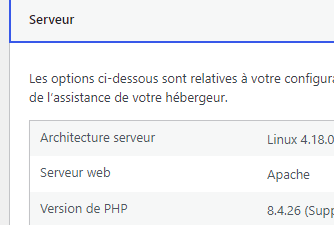
The full number matters. For example, “8.3.36” means you have the patched version, while “8.3.35” or lower means the fix is not installed yet. If you see 8.1, 8.0 or 7.4, your branch is no longer maintained by the PHP project.
One caveat: some hosting providers and Linux distributions apply fixes without changing the displayed version number. If in doubt, your host is the one who can give you a reliable answer.
What to do depending on your situation
You are on shared hosting
This is the case for the vast majority of WordPress sites run by small businesses, freelancers and non-profits (o2switch, OVHcloud, Infomaniak, Hostinger, SiteGround, etc.). With this type of hosting, the provider installs PHP updates on its servers. Your role is twofold:
- check that you are using a version that is still maintained (8.2 at the very least, ideally 8.3 or later)
- if not, switch versions from your customer area or cPanel, after checking that your theme and plugins are compatible. Keep in mind that with some hosts, changing the PHP version also means changing the options and settings that come with it (memory limit, extensions such as imagick, etc.).
Feel free to check your host’s announcements or contact their support to find out whether the October 21 fixes have been deployed on your server.
You have a VPS or a dedicated server
Here, the update is up to you, or to whoever manages the server. The PHP team says that Linux distributions and extended support vendors received the patches in advance: update your system’s PHP packages, then restart the relevant services (PHP-FPM, Apache, etc.) so the new version is actually loaded.
You are still on PHP 7.4, 8.0 or 8.1
This is the most urgent situation. Jumping from an old PHP version to a recent one can cause a fatal error if your theme or a plugin is not compatible: your site may then show a blank page, both for visitors and in the admin area. So don’t switch versions blindly.
I explain how to change versions without breaking your site (full backup, checking plugin and theme compatibility, upgrading step by step) in my guide How to Choose Your PHP Version for WordPress.
Workaround settings are not enough
You may read on some forums that changing a setting in php.ini is all it takes. Be careful: the PHP team and CERT-FR do suggest temporary measures for servers that cannot be updated right away, for example:
- disabling upload progress tracking (session.upload_progress.enabled)
- lowering the maximum size of submitted data (post_max_size)
- blocking or monitoring “multipart” requests with a web application firewall.
But PHP’s official announcement is unambiguous: only updating is a complete fix. These measures reduce exposure to some attack paths without making the installation safe. CERT-FR adds that disabling session.upload_progress.enabled only protects against one of the two vulnerabilities. And blocking “multipart” requests can break your site’s file upload features (media library, forms with attachments, etc.).
If your site runs through Cloudflare, the company has deployed firewall rules against known attacks, including for free plans, according to Tenable. Cloudflare itself describes them as a stopgap that only protects traffic going through its services.
What about after the update?
Once your PHP version is up to date, keep an eye on your site over the following days. An attack may have happened before the fix was installed. Warning signs to watch for: new administrator accounts you don’t recognize, unknown files on your hosting account, strange redirects, spam pages indexed in Google or alerts from your security plugin.
If you have any doubt, I describe how I tracked down and cleaned up an infection in How I uncovered the Malware and repaired a hacked WordPress installation.
Note that following this worldwide announcement, many specialized media outlets are now covering the topic. Hosting providers will very likely handle part of the security work. Still, checking your PHP version at the very least tells you where you stand, for this alert and more generally for your site’s proper functioning and security.
Need help securing your site?
Checking the PHP version, testing theme and plugin compatibility, switching versions without downtime and making sure the site has not been compromised: this is exactly the kind of work I do every day as a freelance WordPress webmaster.
Your site shows an error, you think it has been hacked, or you would rather not have to monitor this kind of alert yourself? Get in touch.
Official sources
- CERT-FR alert CERTFR-2026-ALE-014: multiple vulnerabilities in PHP (in French)
- PHP security announcement of October 21, 2026
- Unsupported PHP versions
- Tenable: php2shell frequently asked questions
Vous souhaitez voir Yes We Blog en priorité dans vos résultats Google ?
